How to Create a subdirectory in your WordPress without Using a Cpanel
Key Takeaways:
1. Subdirectories can be created directly within WordPress without needing access to cPanel.
2. Plugins like “WP Subdirectory” simplify the process for non-technical users.
3. Proper configuration of site settings and permalinks ensures the new subdirectory functions smoothly.
4. This method is useful for setting up microsites, language variations, or campaign-specific pages.
5. Always backup your site before making structural changes.
Hi, welcome to the Radian Marketing blog. Under 6 minutes, you’ll be able to know how to create a subdirectory in your WordPress without Using a Cpanel. Along with this, you’ll understand the importance of having subdirectories in a website. So, let’s dive in.
What is a Subdirectory?
Subdirectory is a folder where you want specific pages to be kept. Let me explain this to you through an example. Suppose a website (studentlifesite.com), and you want a separate folder or directory for college student life. Now, your subdirectory would look like /college-student and the URL to access the page under this subdirectory would be studentlifesite.com/college-student.
Why do you need a Subdirectory?
You may need a subdirectory for multiple reasons. Businesses often create subdirectories to make it easier for users to find services based on category. Bloggers create subfolders to create separate spaces for readers to find related content in their blog. For instance, a recipe blogger might want to publish her morning recipes in a separate subdirectory.Similarly, an eCommerce business can use subdirectory to list products of the same category. Any new product pages in the category subdirectory will have a separate URL as shown here – myecommercesite.com/product-category/product-name
How to create a Subdirectory in WordPress without coding?
Creating a subdirectory in WordPress is quite easy as compared to when done through cPanel or through coding.
Here’s a step-wise guide to do it:
Step 1: Login to your WordPress admin panel.
Step 2: Go to ‘Pages’. Click ‘Add New Page’.
Step 3: This page will be your new subdirectory under your domain. You need to name the page and give a URL to make a page.
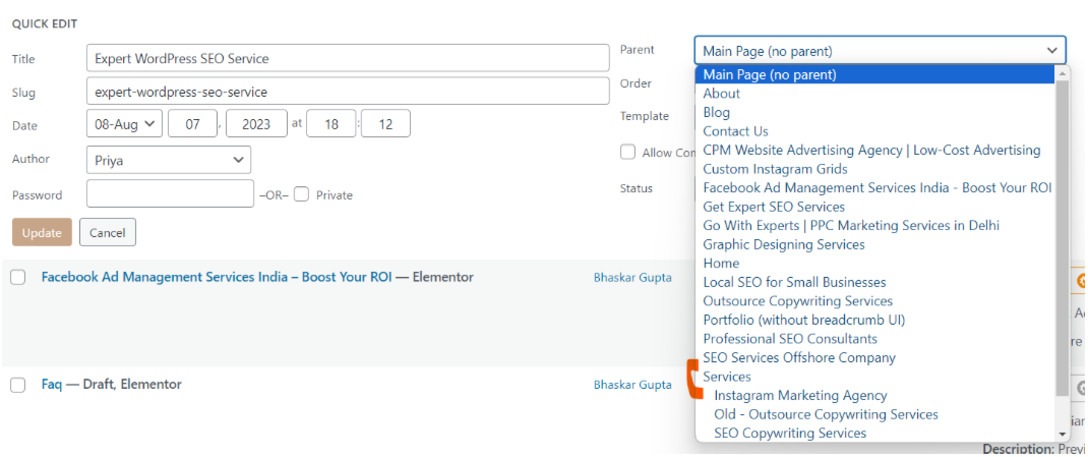
Step 4: Now, you want to add new pages under this subdirectory. You can add any existing page or create a new page to the subdirectory. For this, click on quick edit on that page and select the parent (or directory) under which you want your page to be.
In the screenshot above, you can see that the ‘Expert WordPress SEO Service’ page is under ‘Main Page’ currently. That means, I have not kept it under any directory. Once I click on ‘Services’ or any other page other than the Main Page, that page will become subdirectory automatically.
Well, you might be wondering – why is it needed? Can a business just skip creating subdirectories and publish all pages under a domain name?
Your question is valid and I’ll tell you the importance of subdirectories. Making subdirectories in websites gives you two major advantages, viz.
User-friendliness
It makes your website useful for visitors and helps them understand the structure of the website and navigate properly. They can easily find products under a category, categorize well and discover new categories in your brand.
SEO
From the perspective of search engine optimization, it’s crucial to tell the structure of your website to site crawlers and bots. It will only impact positively on your website optimization as search engines tend to push such businesses which have proper categories within the website.
Hope this blog helped you in creating a subdirectory within WordPress. Take advantage and get this done to boost your website to its full potential.
FAQ
What does a Subdirectory look like? It looks similar to a website URL. A subdirectory named ‘s190’ in a domain called parrot.com will look like parrot.com/s190
How many levels of Subdirectory can I have? You can have multiple levels or layers of subdirectories. For instance, if you want to create another subfolder under the s190 directory we created above, you can do that. Then your new URL address will look like parrot.com/s190/another-subdirectory-name.
Table of Contents
FAQs
1. What is SEO for homeware brands?
SEO for homeware brands is the process of optimizing a homeware ecommerce website so its products, categories and content can appear for relevant searches. It includes technical SEO, keyword research, product optimization, content, internal linking and link building.
2. What is a good SEO score?
A good SEO score generally indicates that a website has fewer technical and on-page SEO issues. However, the score itself does not guarantee higher Google rankings. Search intent, content quality, competition, backlinks, and other SEO factors also influence organic visibility.
3. Does an SEO score affect Google rankings?
An SEO score itself is not a Google ranking factor. It is mainly a diagnostic metric provided by SEO tools. Improving the issues identified by an SEO score checker can help create a technically healthier and better-optimized website.
4. How often should I check my website SEO score?
You can check your SEO score regularly, particularly after major website changes, technical updates, redesigns, or content optimization. A monthly or quarterly review can also help identify new issues.
5. Can an SEO score checker find technical SEO issues?
Yes. Depending on the tool, an SEO score checker can identify issues such as broken links, missing metadata, indexing problems, heading issues, page-speed concerns, and other technical SEO elements.
6. How to choose marketing channels for enterprise saas
Enterprise SaaS requires trust-building channels like LinkedIn Ads, ABM campaigns, webinars, events, long-form content, and SEO. These help reach decision-makers, support multi-touch buying journeys, and create high-quality pipelines.
6. How can I improve my website SEO score?
Start by fixing high-impact technical issues, optimizing page titles and meta descriptions, improving content, strengthening internal linking, optimizing images, improving page experience, and making sure important pages can be crawled and indexed.
7. Can SEO score checking help with keyword research?
An SEO score checker primarily evaluates website optimization, while dedicated keyword research tools are used to identify search terms and analyze search demand and competition. Combining both can help create a more complete SEO strategy.
8. How can Hyperclients help with lead generation?
Hyperclients can help businesses discover relevant LinkedIn posts based on the services they offer. For example, a video editing business can search for “video editing” to identify conversations that may indicate a potential requirement for the service.
About The Author
Bhaskar Gupta
Bhaskar Gupta is a passionate digital marketing practitioner and has keen interest in SEO, Social Media Strategy, Business Digital growth, and Performance marketing. He has worked with multiple brands in different industries across India and abroad. In 2022, he has set up his own digital growth and marketing agency named Radian Marketing.
This article was edited by the Radian Marketing editorial team. Radian Marketing is committed to providing actionable insights and transparent coverage of digital marketing, SEO, Facebook marketing, CRO and growth strategies.