Mastering Google Search Console: A Comprehensive Guide to Optimizing Your Online Presence
Mastering Google Search Console: A Comprehensive Guide to Optimizing Your Online Presence
Google Search Console (GSC) is an essential tool for website owners, marketers, and SEO professionals to monitor, maintain, and troubleshoot their site’s presence in Google Search results. Setting up Google Search Console correctly and understanding its features can significantly boost your website’s visibility and performance. This comprehensive GSC setup guide walks you through the setup process, highlights key features, and introduces advanced tools such as the Disavow Links tool to keep your SEO efforts on track.
How to set up Google Search Console
To get started with Google Search Console, log in using the same Google account that’s linked to your Google Analytics. This method simplifies the verification process since, with Analytics already set up, GSC verification becomes automatic. If not, you’ll need to go through the manual verification process, which involves methods like uploading an HTML file, adding a meta tag to your website, or using your domain name provider.
Once your account is verified, you can start leveraging GSC to support a range of SEO efforts, from monitoring indexing issues to improving site performance and visibility in search. For businesses targeting local audiences, pairing GSC insights with a solid local citation strategy can further enhance your local SEO and search rankings across directories and map listings.
Choosing the Right Verification Method
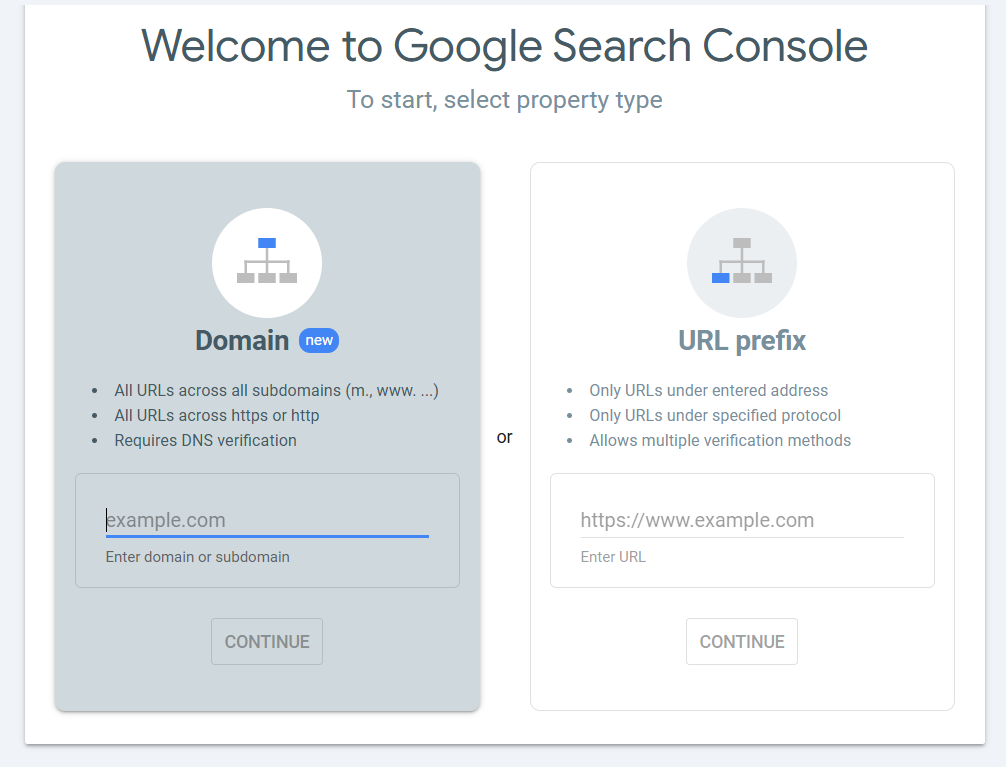
When you add a new property in GSC, you are presented with two options, as shown in image:
Domain Verification: Requires DNS verification through your domain provider. This method is more complex and not recommended for beginners.
URL Prefix: Easier to set up. You simply enter your website URL, and if Google Analytics is linked to the same account, ownership verification is automatic.
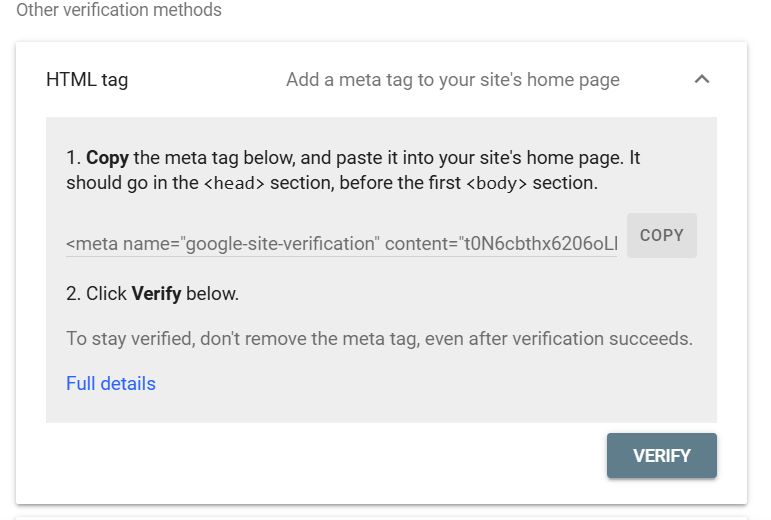
If automatic verification does not happen, you can manually verify by adding an HTML tag as shown in the image, to your website’s <head> section, uploading an HTML file, using Google Tag Manager, or verifying through your domain provider.
Exploring Google Search Console Features
Once verified, your GSC dashboard will start populating data over time. Here are the key sections you will interact with:
1. Performance Report
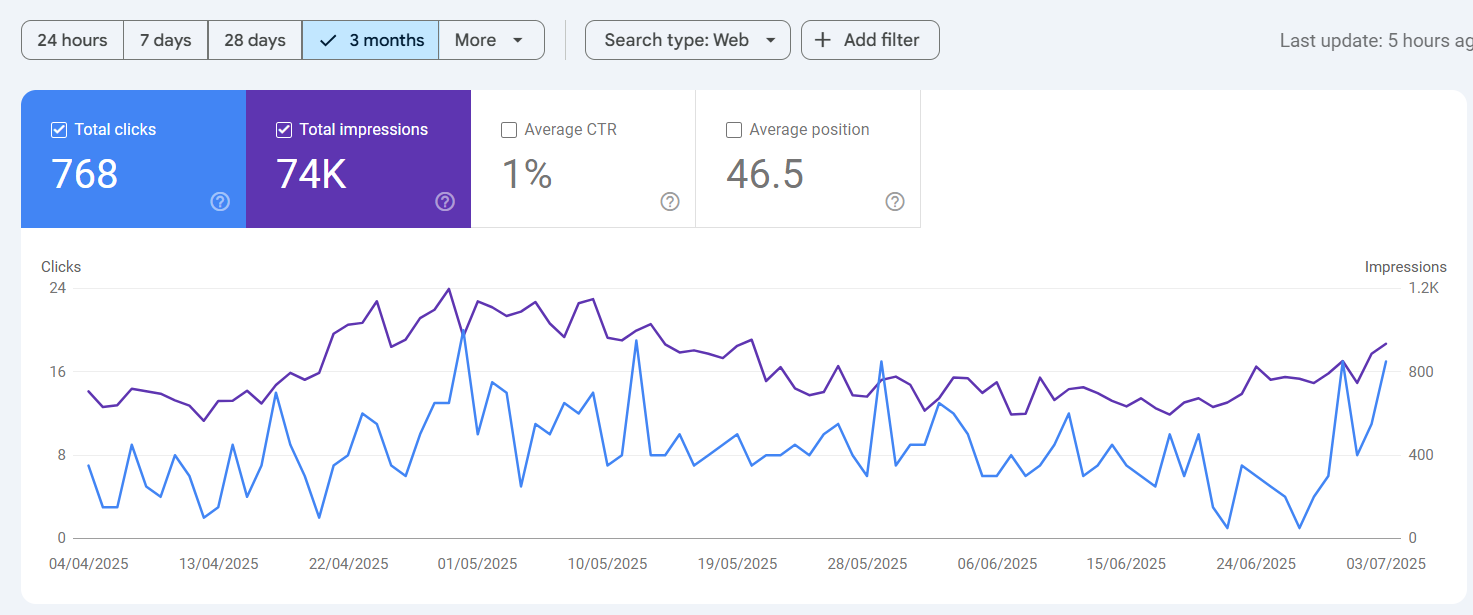
The Performance report is crucial for understanding how your website performs in Google Search. It provides key data such as total clicks, impressions, average click-through rate (CTR), and average position as shown in the image. With the detailed view, you can select a custom date range, apply filters by query, page, country, device, and more to gain deeper insights into your search performance.
Total clicks your site has received
Total impressions (how often your site appeared in search results)
Average click-through rate (CTR)
Average position on search results pages
You can customize the date range to analyze data from the last 7 days, 6 months, 16 months, or even a custom period.
The report allows you to filter data by queries (keywords), pages, countries, devices (desktop, mobile, tablet), and search appearance (structured snippets).
Tip: The average position metric can fluctuate because Google continuously adds and removes keywords. Focus more on clicks, impressions, and CTR for accurate insights.
While tools like Google Search Console offer real, actionable insights, it’s equally important to be aware of misleading platforms. Check out our guide onfake SEO tools you should avoid to protect your strategy from unreliable data.
2. URL Inspection Tool
This tool lets you inspect individual URLs on your website. It shows if a URL is indexed by Google, any indexing issues, last crawl date, and whether crawling and indexing are allowed.
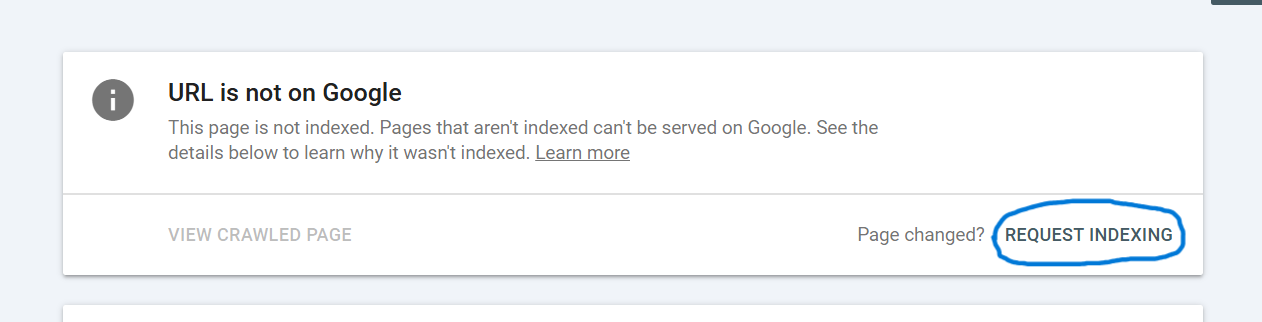
If your new page is not indexed, you can request indexing manually here as shown in below image. This is useful for smaller numbers of URLs (up to about 10-20). For larger sites, submitting a sitemap is a better approach.
3. Index Coverage Report
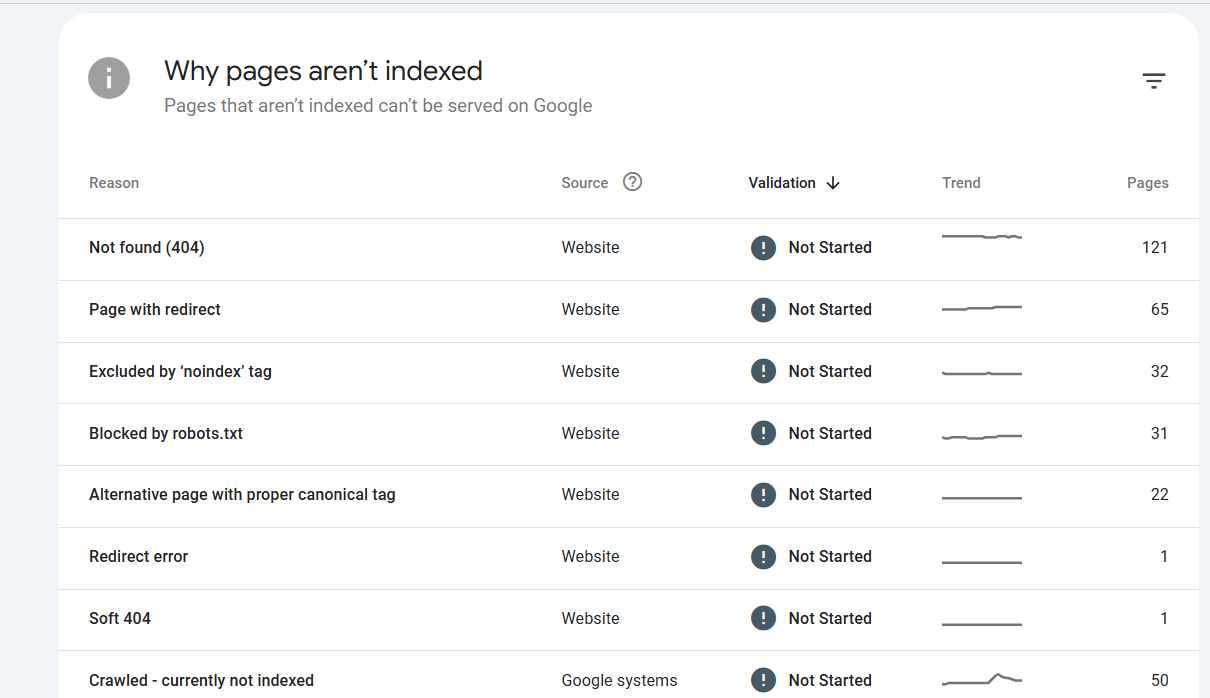
This section shows which pages are indexed and which are not, along with the reasons for exclusion as shown in the image below.
Redirects
Pages blocked by robots.txt
Noindex tags
Canonical tags pointing elsewhere
Discovered but not yet indexed pages
You can take corrective actions based on these insights, such as updating your robots.txt file or manually submitting URLs for indexing.
4. Sitemap Submission
Submitting a sitemap helps Google discover all your important pages efficiently. To submit, enter the sitemap URL in the designated section and click ‘Submit’ as illustrated in the image. This should be done after your site is verified and your sitemap is live.
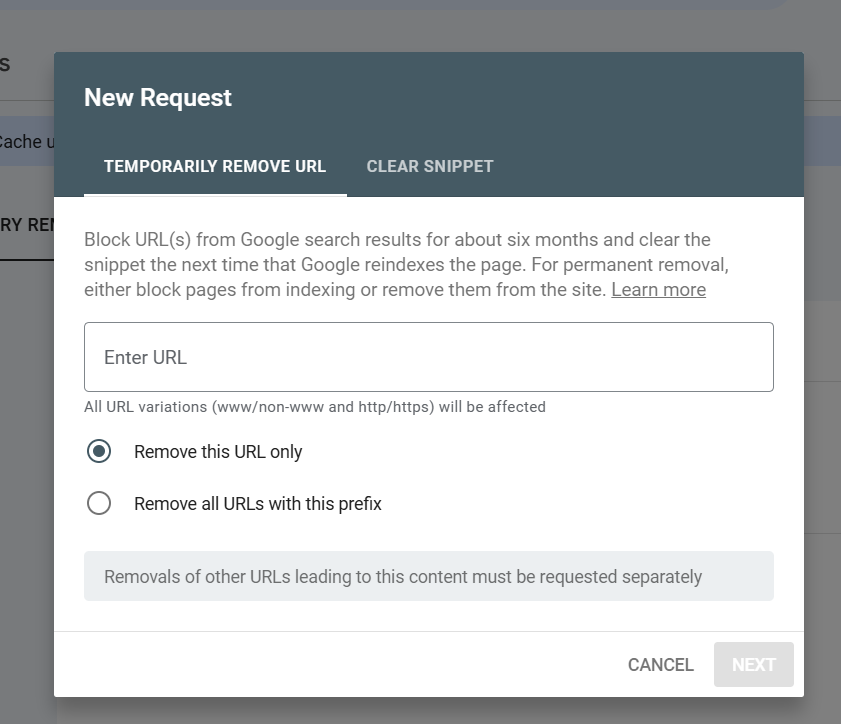
5. Removals Tool
If you need to remove outdated or unwanted pages from Google’s search index, the Removals tool allows you to submit requests. You can remove:
An exact URL
All URLs with a specific prefix (useful for removing entire folders or sections)
Monitoring Site Experience and Enhancements
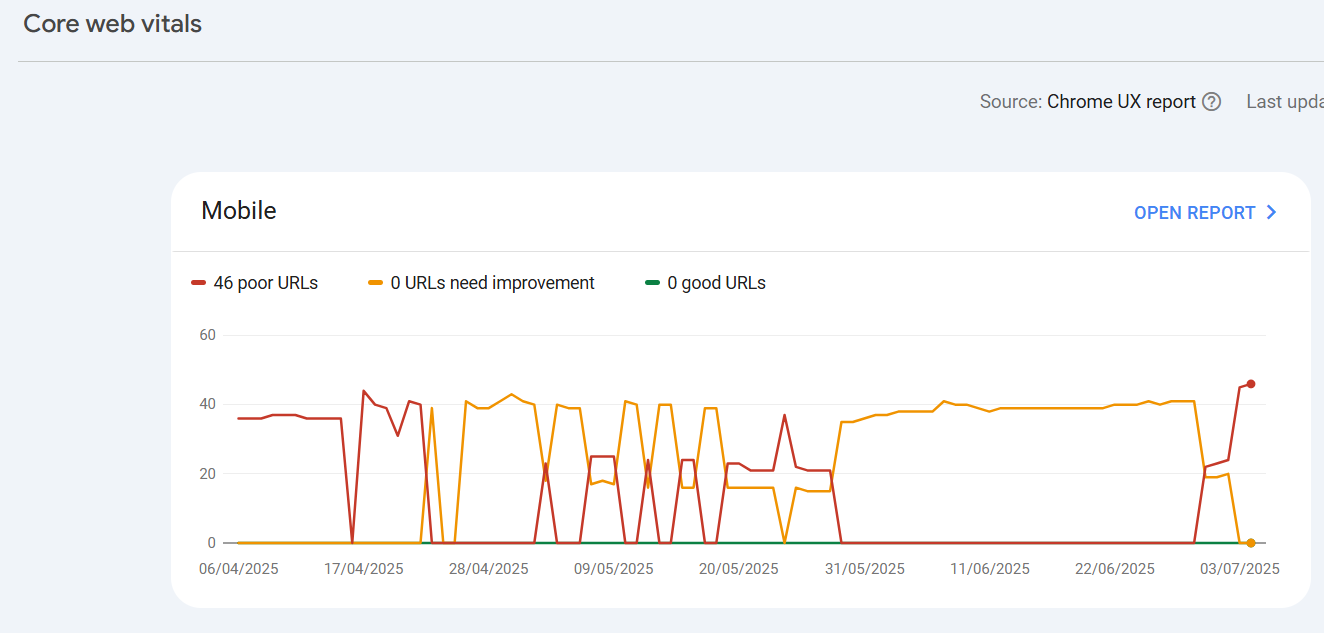
Core Web Vitals
Google Search Console provides insights into your website’s Core Web Vitals, categorized separately for desktop and mobile. These vitals measure loading performance, interactivity, and visual stability, which are crucial for user experience and SEO as illustrated in the image.
The report highlights issues needing improvement so you can prioritize fixes that enhance site usability.
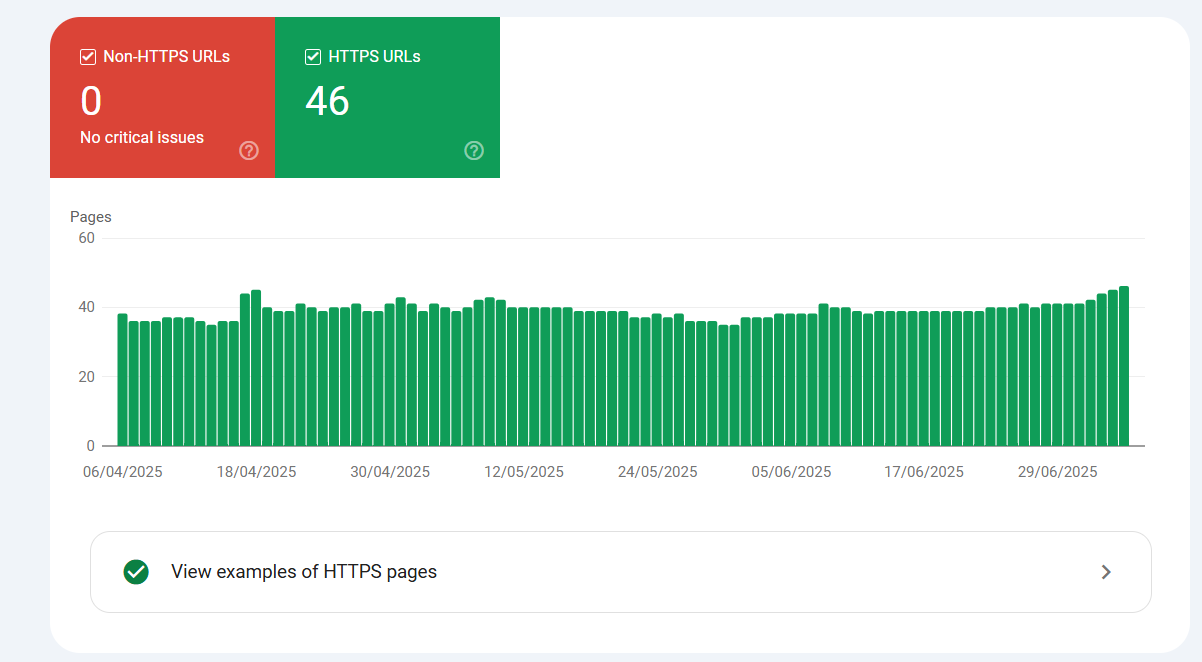
HTTPS Status
GSC confirms whether your site’s pages are served securely over HTTPS. Having HTTPS is essential for security and trustworthiness.
Structured Data Enhancements
Structured data helps Google understand your site content better and can improve your search listings with rich snippets. GSC tracks enhancements such as:
FAQ snippets
Review snippets
Site link search boxes
Maintaining valid structured data can boost your click-through rates and indexing efficiency.
Advanced Tools: Disavowing Bad Backlinks
Backlinks are a valuable ranking factor in Google Search Console for SEO, but spammy or irrelevant ones can harm your site’s credibility and visibility. That’s why Google Search Console for marketers includes a powerful tool to review and manage backlinks—helping you maintain a healthy backlink profile.
How to Disavow Harmful Links in Google Search Console:
Compile a list of spammy or irrelevant domains linking to your site.
Go to the Disavow Links tool in GSC.
Select your verified property.
Upload a text file listing the domains or URLs you want to disavow.
Submit the file to inform Google not to consider these links in ranking calculations
Important: Use this feature cautiously and only disavow links you are certain are harmful.
Managing backlinks is just one part of a broader SEO and lead generation strategy.
In the travel industry? Discover our SEO guide for the travel industry to turn online visibility into real-world bookings and conversions.
Additional Features and Settings
Security and Manual Actions
If Google detects any manual penalties or security issues related to your site, notifications will appear in this section. Addressing these issues promptly is crucial to maintaining your website’s credibility and ranking especially if you’re working through a GSC setup guide to ensure all elements are properly configured.
Links Report
This section provides a complete overview of all backlinks pointing to your website, including the top linking domains. Regularly reviewing this report is essential when using Google Search Console for SEO, as it helps monitor and improve your backlink profile for better search visibility.
Settings and Crawl Stats
Under the Settings tab, you can review your verified ownership details, important if you’re learning how to set up Google Search Console and access Crawl Stats to understand how often and efficiently Googlebot crawls your website. Efficient crawling is especially important after actions like submitting your sitemap to Google.
Want more ways to grow your brand visibility and community? Don’t miss our guide on thetop Facebook groups for business owners,a great companion strategy to SEO that can help you generate leads and network with like-minded professionals.
Conclusion
Google Search Console is a powerful tool for managing your website’s search presence and improving overall SEO performance. With a quick GSC setup guide and automatic verification options like Google Analytics integration, you can effortlessly complete the Google Search Console setup and start leveraging its capabilities. From monitoring in-depth performance reports, conducting URL inspections, and managing structured data, to checking Core Web Vitals and indexing status, GSC equips you with everything needed to keep your website optimized and healthy.
When combined with strategies like how to do SEO for Google AI Overview, it becomes an even more effective solution for boosting visibility in AI-driven search results.
One of the most impactful features is the ability to submit your sitemap to Google, ensuring faster and more accurate indexing. Additionally, marketers can use tools like the Disavow Links feature to protect their sites from spammy or harmful backlinks. Whether you’re a business owner or a marketer, using Google Search Console in digital marketing allows for data-driven decision-making and long-term success.
For those looking to grow their online presence beyond SEO, check out our expertOnline Business Lead Generation Tips to drive qualified traffic and improve conversions through effective digital strategies.
Frequently Asked Questions
Table of Contents
FAQs
1. What is SEO for homeware brands?
SEO for homeware brands is the process of optimizing a homeware ecommerce website so its products, categories and content can appear for relevant searches. It includes technical SEO, keyword research, product optimization, content, internal linking and link building.
2. What is a good SEO score?
A good SEO score generally indicates that a website has fewer technical and on-page SEO issues. However, the score itself does not guarantee higher Google rankings. Search intent, content quality, competition, backlinks, and other SEO factors also influence organic visibility.
3. Does an SEO score affect Google rankings?
An SEO score itself is not a Google ranking factor. It is mainly a diagnostic metric provided by SEO tools. Improving the issues identified by an SEO score checker can help create a technically healthier and better-optimized website.
4. How often should I check my website SEO score?
You can check your SEO score regularly, particularly after major website changes, technical updates, redesigns, or content optimization. A monthly or quarterly review can also help identify new issues.
5. Can an SEO score checker find technical SEO issues?
Yes. Depending on the tool, an SEO score checker can identify issues such as broken links, missing metadata, indexing problems, heading issues, page-speed concerns, and other technical SEO elements.
6. How to choose marketing channels for enterprise saas
Enterprise SaaS requires trust-building channels like LinkedIn Ads, ABM campaigns, webinars, events, long-form content, and SEO. These help reach decision-makers, support multi-touch buying journeys, and create high-quality pipelines.
6. How can I improve my website SEO score?
Start by fixing high-impact technical issues, optimizing page titles and meta descriptions, improving content, strengthening internal linking, optimizing images, improving page experience, and making sure important pages can be crawled and indexed.
7. Can SEO score checking help with keyword research?
An SEO score checker primarily evaluates website optimization, while dedicated keyword research tools are used to identify search terms and analyze search demand and competition. Combining both can help create a more complete SEO strategy.
8. How can Hyperclients help with lead generation?
Hyperclients can help businesses discover relevant LinkedIn posts based on the services they offer. For example, a video editing business can search for “video editing” to identify conversations that may indicate a potential requirement for the service.
About The Author
Bhaskar Gupta
Bhaskar Gupta is a passionate digital marketing practitioner and has keen interest in SEO, Social Media Strategy, Business Digital growth, and Performance marketing. He has worked with multiple brands in different industries across India and abroad. In 2022, he has set up his own digital growth and marketing agency named Radian Marketing.
This article was edited by the Radian Marketing editorial team. Radian Marketing is committed to providing actionable insights and transparent coverage of digital marketing, SEO, Facebook marketing, CRO and growth strategies.